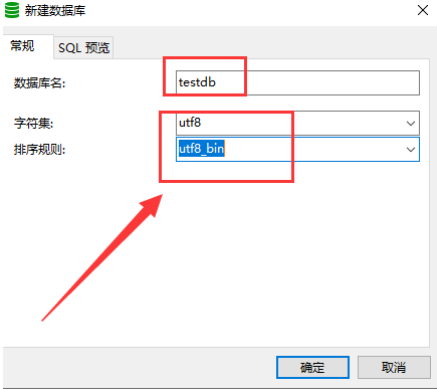
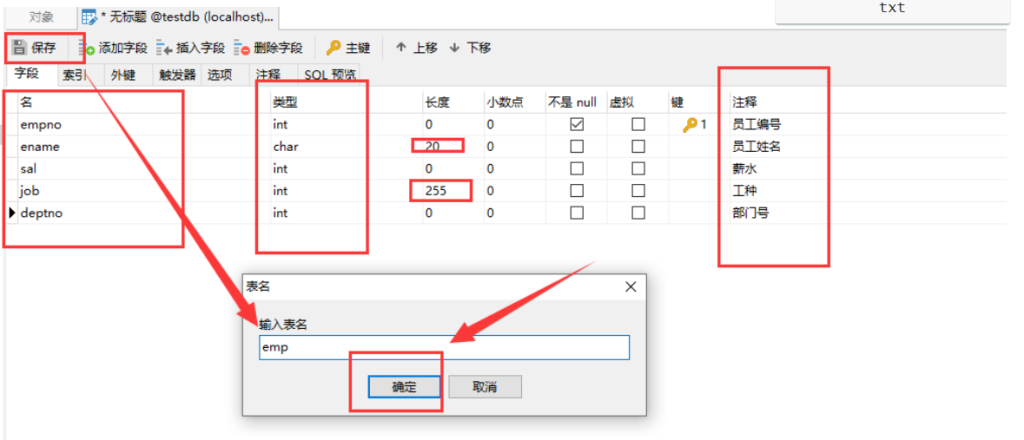
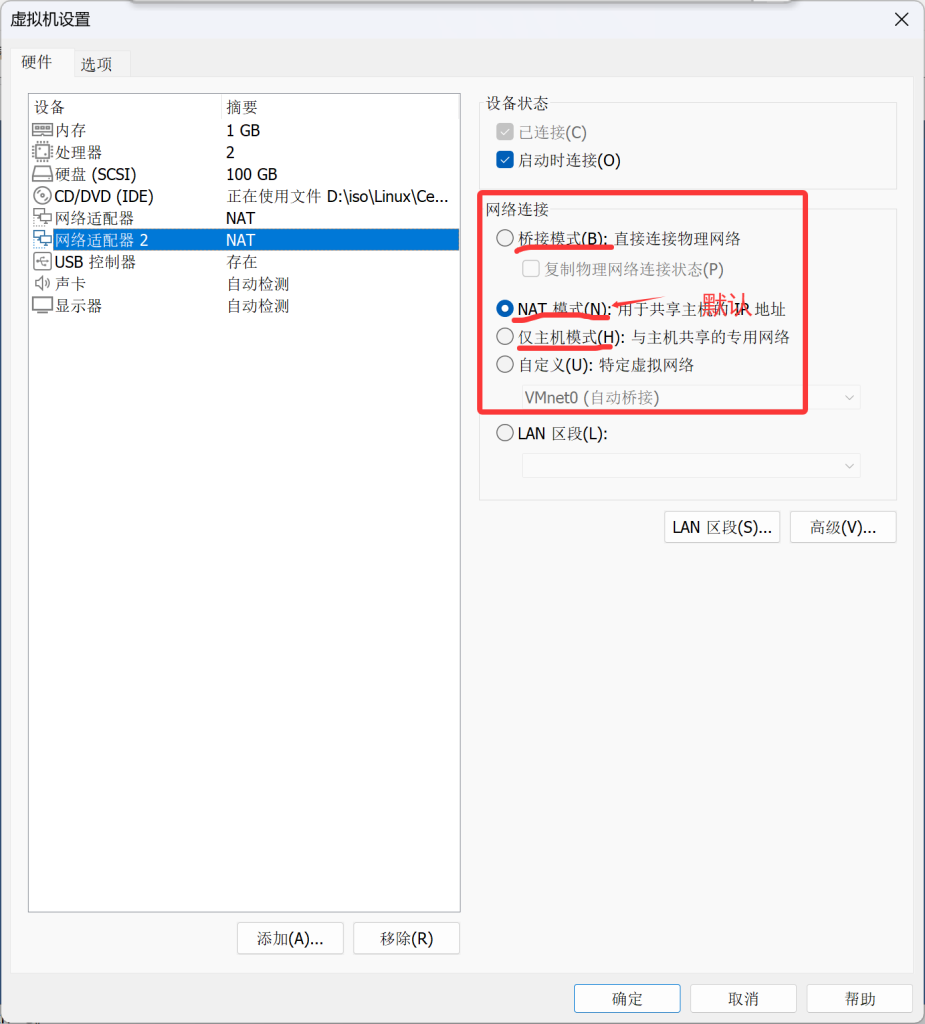
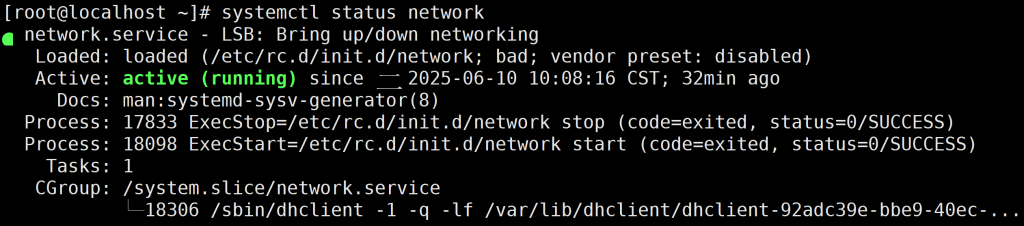
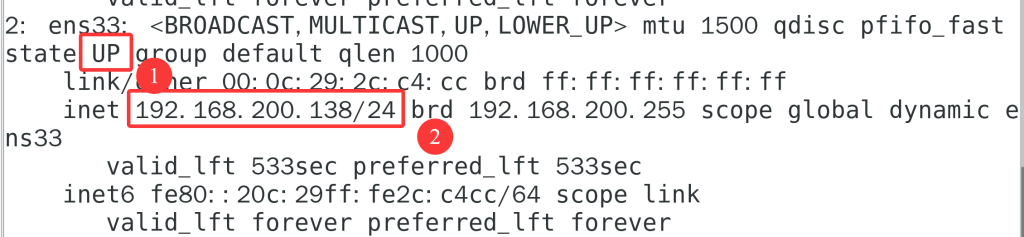
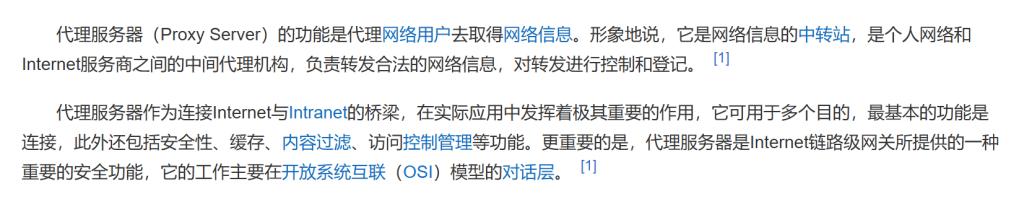
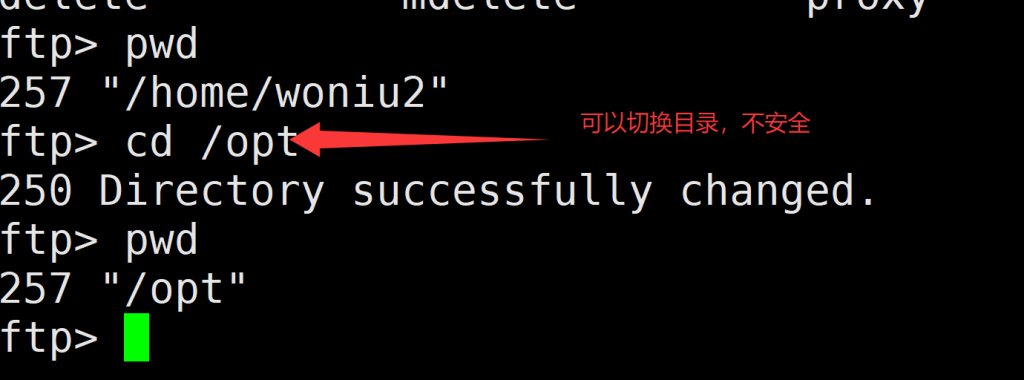
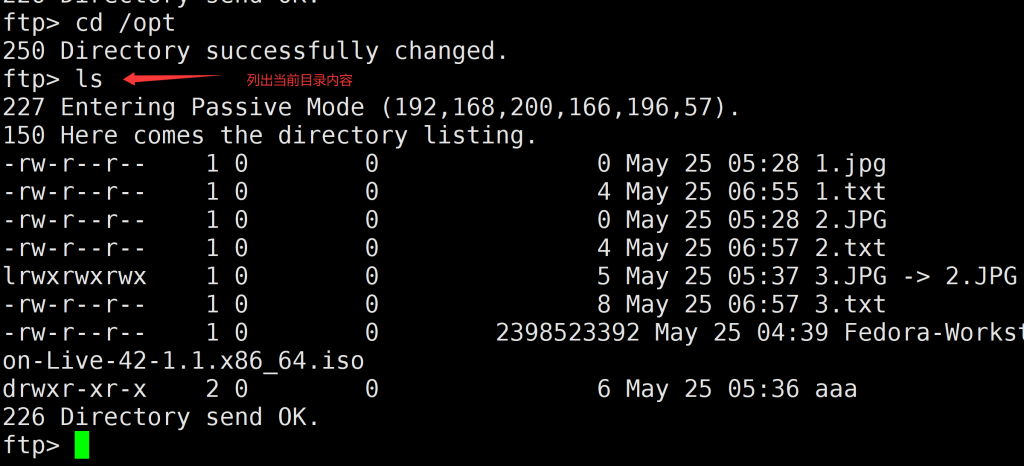
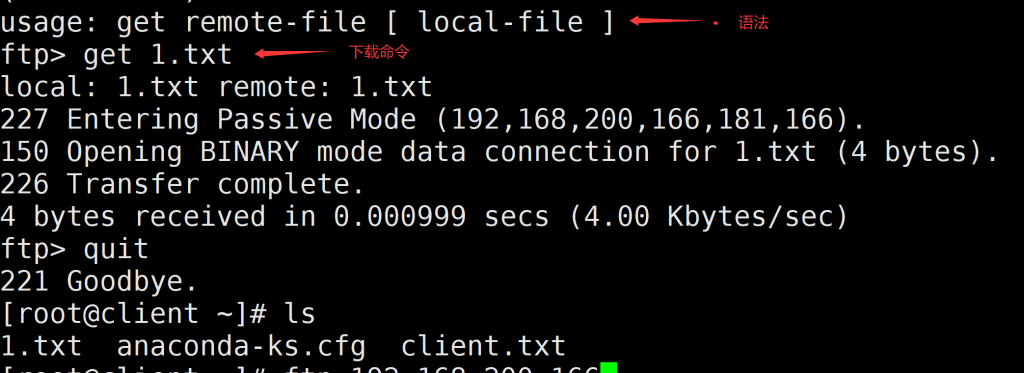
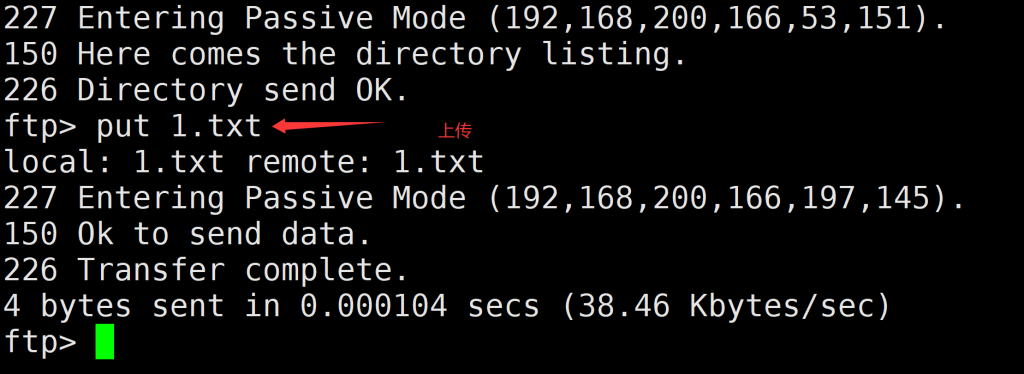
-- 示例 create table user_info ( id int primary key auto_increment, ssex char(1) not null -- 非空 )
8.5 默认值 default
特点:
(1) 插入数据时,不提供值便采默认值,提供值则不使用默认值

-- 示例
create table user_info
(
id int primary key auto_increment,
address varchar(50) default '湖北武汉'		-- 添加默认地址为湖北武汉
)
8.6 检查约束 check新 enum老
特点:
(1) 检查 插入的数据是否符合检查约束条件(表达式)

create table user_info
(
id int primary key auto_increment,
ssex char(1) not null check(ssex='男' or ssex='女'),		-- 非空,检查   新版
ssex enum('男','女')										-- 检查       老版
)
注:check约束 -MySQL5.7直接不支持 CHECK 约束 老版MySQL使用enum
8.7 外键约束 foreign key
特点
特点:
(1) 用于建立表与表之间的关联关系
(2) 外键列不能出现引用的主键列中不存在的值
语法
-- alter table 添加外键
alter table 子表 add constraint fk_子表名_主表名
foregin key(外键列名) references 主表名(主键列名);
示例
alter table orders add constraint fk_orders_users
foregin key(user_id) references user_info(id);
8.8 *表关系
*表关系分为三种
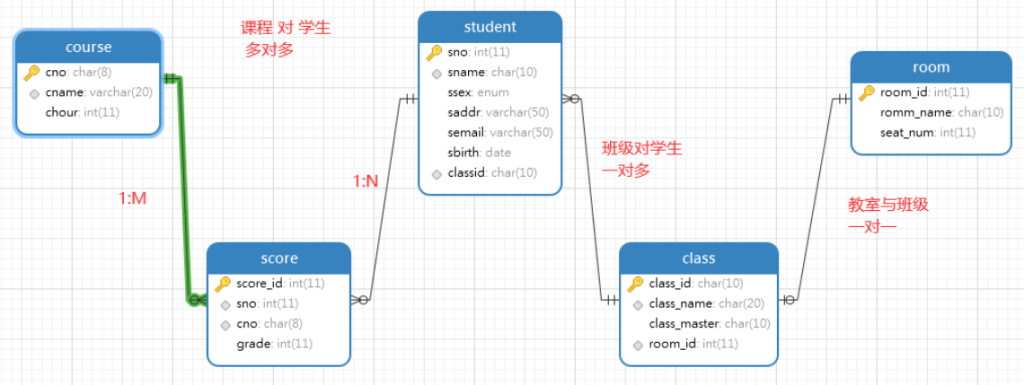
一对一
1:1 一边表中的一行数据与另一边表只有一行数据对应
另一边表中的一行数据与这边的表的数据也只有一行对应
举例:学生表(身份证ID-唯一) - (身份证ID-PK)身份证表
举例:班级表(class) - 教室表(room)
一对多
1:M 一边表中的一行数据与另一边表中的多行数据对应
另一边表中的一行数据与这边的表的数据也只有一行对应
举例:班级表 -- 学生表
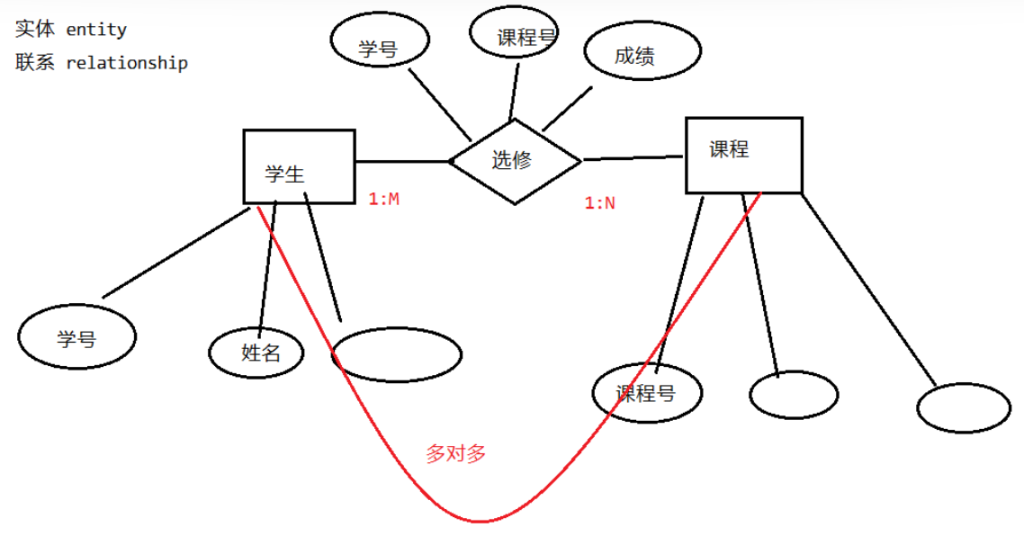
多对多
M:N 一边表中的一行数据与另一边表中的多行数据对应
另一边表中的一行数据与这边的表的数据有多行对应
注意:多对多两张表没有直接联系,而是通过中间表进行关联
举例:读者 - 借阅- 图书
举例:学生表 -选修关系表 - 课程
9.DQL基础查询
9.1 运算符查询(算数、关系、逻辑)
算术运算符
算术运算符 +,-,*,/,%
关系运算符
6种: > , >= , <, <= , =, '<> [不等于]'
逻辑运算符
-- 作用: 用于连接多个条件,组合为复合条件
3种: '与and','或 or','非 not'
#  条件1 and 条件2 都为真,结果才为真
#  条件1 or 条件2 只需要1个条件为真,结果就为真
#  结果:真(1) 假(0)
9.2 查询行和列
查询所有行和列的数据
-- 示例
select * from student;
查询部份列
-- 示例
select sno,sname from student			-- 查询学号和姓名两个列
查询的列名命名别名
select sno as '学 号',sname '姓+名',sage 年龄			-- 查询的列名命名别名
from student
9.3条件查询
语法
select 字段列表
from 表名
[where 条件]

-- 关系运算符(>,>=,<,<=,=,<>)和逻辑运算符(and,or,not)
1、= 等于
2、!= 不等于
3、>= 大于或等于
4、>  大于
5、<  小于
6、<= 小于或等于
7、<> 不等于
8 类似: age >= 18 and age <= 60
9、and 拼接多个条件,多个条件要同时成立
10、or  拼接多个条件,多个条件任意满足一个就可以
示例
-- 查询学生表中年龄在23岁以上的学生的学号,姓名,年龄和性别
select sno 学号,sname 姓名,sage,ssex 性别
from student
where sage>=23

-- 查询学生表中年龄在23岁以上的女生信息
select sno 学号,sname 姓名,sage,ssex 性别
from student
-- where not (sage>=23 and ssex='女')
-- 等价于
where sage<23 or ssex<>'女'

-- 查询学生表中年龄在23岁以上或性别是女生
select sno 学号,sname 姓名,sage,ssex 性别
from student
where sage>=23 or ssex='女'
9.4 模糊查询
(1)like与not like
-- 通配符 % 用于匹配任意长度的任意字符 _ 用于匹配1个长度的任意字符
like 作为模糊查询的运算符,用于条件匹配批量的数据值

-- like 模糊匹配 not

-- 通配符
-- % 用于匹配任意长度的任意字符
-- _ 用于匹配1个长度的任意字符

-- 查询姓名中含有'小'字的学生记录
select * from student where sname like '%小%'

-- 查询姓名中不含有'小'字的学生记录
select * from student where sname not like '%小%'

-- 查询姓名中是以'小'字开头的学生记录
select * from student where sname like '小%'

select * from student where sname like '小' -- 等价于 sname='小'

-- 查询姓名中姓王,且2个字的学生信息
select * from student where sname like '王_'

-- 3字人名
select * from student where sname like '王__'
(2)between...and 与 not between... and
-- 判断某列的值是否处于某个区间范围 [数值型和日期型列]

-- 查询学生表中年龄在21~24之间学生
select * from student where sage between 21 and 24
-- 等价写法
select * from student where sage >= 21 and sage<=24

-- not between... and
select * from student where sage not between 21 and 24

-- 查询日期范围
select * from student where sbirth between '2001-1-1' and '2002-7-31'
(3)in谓词 与 not in
语法
语法: where 列 in (值1,值2,....)
示例
-- 查询classid班级号为J001,Y001,Y002任意的学生
select * from student where classid='J001' or classid='Y002' or classid='Y001'
-- 等价写法
select * from student where classid in ('J001','Y002','Y001')

select * from student where classid not in ('J001','Y002','Y001')
9.5 排序查询
语法
select 字段列表
from 表名
[where 条件]
[order by  要排序的列1,列2 asc|desc]
asc - 表示升序,可省略,默认为升序 desc - 表示降序,不可省略
示例
select * from student
order by sage asc  -- asc省略时,也是升序

select * from student
order by sage desc

select * from student
order by sbirth+

-- 按中文汉字拼音顺序排序 [了解]
select * from student
order by convert(sname using GBK)

--------------------- 多列排序 [也称为分组排序]
select * from student
order by classid,sage desc -- 先按班级号升序,再到每个班中内部按年龄降序

select * from score
order by grade desc


select * from score
order by sno,grade desc -- 先按学号升序,每个学号所选修课程记录的内部按成绩降序

select * from score
order by cno,grade desc
9.6 空值查询
#空值查询 is null,is not null 仅限于 where子句
示例
-- 查询email为空的学生
select * from student
where semail is null

-- 查询email不为空的学生
select * from student
where semail is not null

-- 但是,如果是update的set子句,则使用=设置为空值
update student set semail=null where sno=7
9.7 去重查询distinct
#关键字: distinct
-- distinct 关键字用于查询时,屏蔽重复的数据行 select distinct sno from score
select 字段列表....
from 表名
where 条件
group by 子句   -- 指定分组的列

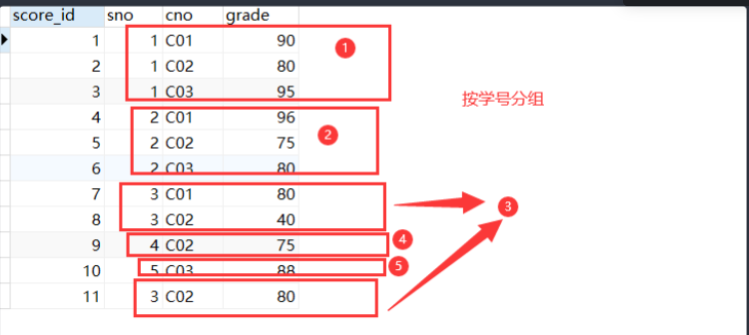
分组的含义: 将指定分组的列中相同的值逻辑上划分为一个组
示例
-- 参加了选修的学生学号
select sno
from score
group by sno

-- 分组+聚合 一起使用
-- 统计每个学生所选修课程的总分,平均分,及选修的科目数
-- select子句同时出现 非聚合函数列与聚合函数列
-- 必须 将所有的非聚合列放在group by 子句中
select sno 学号,sum(grade) 总分,avg(grade) 平均分 ,count(*) 科目数
from score
group by sno

-- 按课程号分组统计总分
select cno,sum(grade)
from score
group by cno

-- 按性别统计人数
select ssex 性别,count(*) 人数
from student
group by ssex
注:
group up 后面最好加上所有的非聚合列名
(2)having 子句
当需要分组后再进行聚合函数的条件判断时,则使用having子句
where -> group by  --> having

示例:
-- 需求: 查询统计参加了补考的学生学号,课程号
select sno,cno
from score
-- where count(*)>1  -- where 表中原始数据的筛选 不能是聚合函数列的条件
group by sno,cno
having count(*)>1    -- having 分组后的数据筛选 聚合函数的条件判断
有group by子句时,不一定有having 但是,有having时,一定要先group by **
10.4限制行查询
语法:
select 列...
from 表
limit [m,] n    -- [放在SQL中所有子句的最后]

对查询结果限制
m - 表示起始行的索引号 [行的索引 从0开始]
n - 限制的记录数  [从1开始计]
示例:
-- 查询前3行 select * from score limit 3 -- 等价写法 select * from score limit 0,3
{a,b,c} x {1,2} = {{a,1},{a,2},{b,1},{b,2},{c,1},{c,2}}
11.2 内/等值连接查询
(1)内/等值连接 — 92标准
1.等值连接  92标准
select score.sno,sname,ssex,sage,cno,grade
from student,score
where student.sno=score.sno

2.另一种写法,为表名起别名
select sc.sno,sname,cno,grade
from student as s ,score as sc
where s.sno=sc.sno

3.三表连接
select score.sno 学号,sname 姓名,score.cno 课程号,cname 课程名,grade 成绩
from student,score,course
where student.sno = score.sno and score.cno=course.cno
(2)内/等值连接 — 99标准
等值连接  SQL 99标准
比SQL92标准执行效率高
-- inner join  内连接
select sc.sno,sname,cno,grade
from student as s  inner join score as sc on s.sno=sc.sno

三表连接 SQL99标准写法
select sc.sno 学号,s.sname 姓名,sc.cno 课程号,c.cname 课程名,sc.grade 成绩
from student as s inner join score sc  on s.sno = sc.sno
inner join course c  on sc.cno=c.cno
11.3 外连接查询
注意:
外连接数据是在内连接数据的基础上进行的补充!!!
分为左外连接与右外连接 — left outer join — right outer join
左外连接
-- 需求: 查询学生的选修记录,要求格式: 学号,姓名,课程号,成绩
-- 另外,没有参加选修的学生学号及姓名也显示,对应课程号和成绩栏显示null
-- left join 左边的表中有数据,右边表中没有的数据也显示,对应栏为NULL
select s.sno as 学号,s.sname as 姓名,sc.cno as 课程号,sc.grade as 成绩
from student as s left join score as sc on s.sno=sc.sno
order by s.sno

左边表的数据补充右边表没有的数据
右外连接
-- right join
select s.sno as 学号,s.sname as 姓名,sc.cno as 课程号,sc.grade as 成绩
from  score as sc right join student as s  on s.sno=sc.sno
order by s.sno

右边表的数据补充左边表没有的数据
案例: 查询出没有参加选修的学生学号,姓名,性别,年龄
select s.sno as 学号,s.sname as 姓名,s.ssex 性别,s.sage 年龄

from student as s left join score as sc on s.sno=sc.sno

where sc.grade is null
11.4 综合示例-多表+分组+聚合
需求: 学号/姓名/总分/平均分

-- step1: 学号/总分/平均分
select sno 学号, sum(grade) 总分,avg(grade) 平均分
from score
group by sno

-- step2: 学号/姓名/总分/平均分
select sc.sno 学号,s.sname 姓名,sum(grade) 总分,avg(grade) 平均分
from score as sc inner join student as s on sc.sno=s.sno
group by sc.sno,s.sname
11.3 case-when子句查询
CASE WHEN子句用于根据条件进行条件判断,并返回相应的结果
(1)语法1:等值条件判断
case 列 when 值1 then 表达式1
when 值2 then 表达式2
...
[else 表达式N]  -- 以上的when值都不能满足列的条件,则执行else部份
-- 如果没有else子句,以上条件都不满足时,则最终结果为 NULL
end -- end不能掉,否则语法错误
示例
select score_id,sno,cno,
case cno when 'C01' then '课程一'
when 'C02' then '课程二'
else '课程三'
end as "课程描述", grade
from score
(2)语法2: 区间范围的条件判断
case  when 列>=值1 then 表达式1
when 列>=值2 then 表达式2
...
[else 表达式N]  -- 以上的when值都不能满足列的条件,则执行else部份
-- 如果没有else子句,以上条件都不满足时,则最终结果为 NULL
end -- end不能掉,否则语法错误 414475
示例
select score_id,sno,cno, grade,
case  when grade>=90 then '优'
when grade>=80 then '良'
when grade>=70 then '中'
when grade>=60 then '及格'
else '不及格'
end as 成绩等级
from score
select
(子查询)  -- 只能是单行单列的结果
from
(子查询)  -- 必须要有查询结果,类型不限: 单行单列,多行单列,多行多列
where
(子查询)
|-条件使用关系运算符: >,>=,<,<=,=,<>  -- 子查询只能是单行单列
|-条件使用in,not in -- 子查询可以是单行单列,多行单列
having
聚合函数 >,<,>=,....in,not in (子查询)  --与where相同


#DML语句中子查询形式:
insert into 表(列,...) values((子查询),(子查询),(子查询)...)
update 表 set 列= (子查询) where (子查询)
delete from 表 where (子查询)
示例
# select 部份子查询 只能是单行单列
-- 需求1:查询学生成绩表中成绩占所有选修成绩的占比
select * from score

select sum(grade) from score

select score_id 序号,sno 学号 ,cno 课程号,grade 成绩,
concat(round(100*grade/(select sum(grade) from score),2),'%') as "占比%"
from score

# from 子查询 只需要有查询的结果的子查询
# 要求:子查询必须指定别名
select a.姓名,b.cno,b.grade
from
(select sno 学号,sname 姓名  from student) as a,
(select sno 学号,cno,grade  from score) as b
where a.学号=b.学号

-- 需求2: 学生成绩表中每个等级的人数
等级  人数
--------------------
优     5
良     2
中     1
及级   3
差     4
select 成绩等级,count(*) 人数
from (
select score_id,sno,cno,grade,
case  when grade>=90 then '01-优'
when grade>=80 then '02-良'
when grade>=70 then '03-中'
when grade>=60 then '04-及格'
else '05-不及格'
end as 成绩等级
from score
) as a
group by 成绩等级
order by 成绩等级

-- 需求3: 选修了C01号课程的成绩比选修了C02号课程的成绩高的学号及姓名
select sno 学号,sname 姓名
from student
where sno in (
select a.sno
from
(select sno,grade from score where cno='C01') as a,-- 查询选修了C01课程的学号及成绩
(select sno,grade from score where cno='C02') as b -- 查询选修了C02课程的学号及成绩
where a.sno=b.sno and a.grade>b.grade
)
-- 另一种写法
select a.sno 学号,c.sname 姓名
from (select sno,grade from score where cno='C01') as a,-- 查询选修了C01课程的学号及成绩
(select sno,grade from score where cno='C02') as b, -- 查询选修了C02课程的学号及成绩
student as c
where a.sno=b.sno and a.grade>b.grade and a.sno=c.sno

# where子查询
-- 关系判断>,>=,<,<=,=,<> 只能是单行单列
-- 谓词in,not in  可以是多行单列

-- 需求4: 查询学生表中年龄高于所有学生的平均年龄的学生
select avg(sage) from student

select *
from student
where sage > (select avg(sage) from student)

-- 需求5: 查询只选修了一门课的学生学号及姓名
select sno 学号,sname 姓名
from student
where sno in (
select sno   -- 子查询:查出只选修了一门课的学号
from score
group by sno
having count(*)=1
)

-- 删除黄晓倩的选修记录
delete from score where sno in (select sno from student where sname='黄晓倩')
需求3: 选修了C01号课程的成绩比选修了C02号课程的成绩高的学号及姓名
select sno 学号,sname 姓名
from student
where sno in (
select a.sno
from
(select sno,grade from score where cno='C01') as a,-- 查询选修了C01课程的学号及成绩
(select sno,grade from score where cno='C02') as b -- 查询选修了C02课程的学号及成绩
where a.sno=b.sno and a.grade>b.grade
)
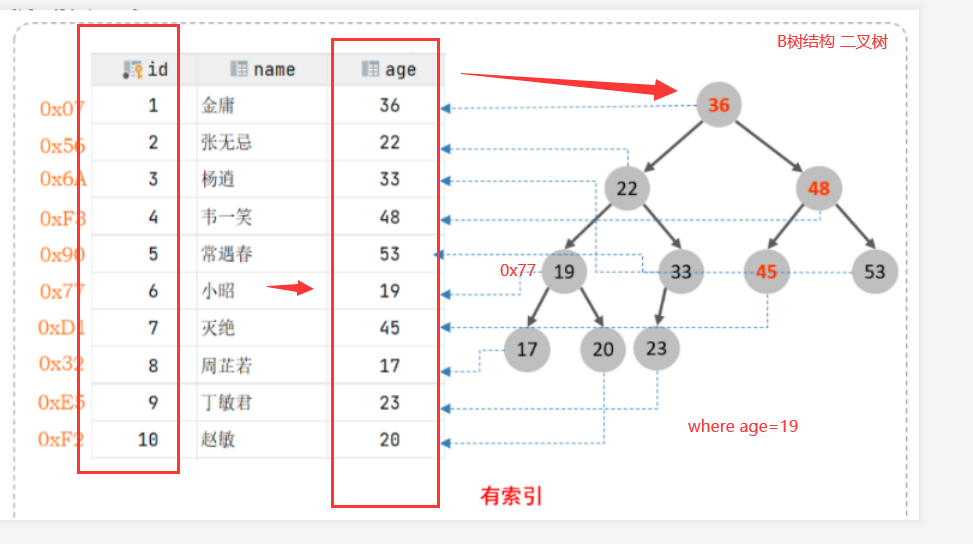
-- 插入百万数据 DELIMITER $$ CREATE FUNCTION mock_data() RETURNS INT BEGIN DECLARE num INT DEFAULT 2000000; DECLARE i INT DEFAULT 0; WHILE i < num DO -- 插入语句 INSERT INTO `app_user`(`name`,`email`,`phone`,`gender`,`password`,`age`) VALUES (CONCAT('用户',i),'123456@qq.com', CONCAT('18', FLOOR(RAND()*((999999999-100000000)+100000000))), FLOOR(RAND()*2), UUID(), FLOOR(RAND()*100)); SET i = i+1; END WHILE; RETURN i; END;
-- 执行可能会出现This function has none of DETERMINISTIC, NO SQL, or READS SQL DATA in its declaration and binary报错。
-- 如果出现,可以先执行set global log_bin_trust_function_creators=TRUE ,然后再试下。
set global log_bin_trust_function_creators=TRUE
-- 执行函数 向表中添加200万行数据 select mock_data();
------------------------------------ -- 查看表上的索引 show index from app_user
-- 为phone列创建索引 create index idx_phone on app_user(phone)
-- 删除表上的idx_phone索引 drop index idx_phone on app_user
-- 测试查询 select * from app_user where phone='18536853057'
#-R 递归显示子目录 [root@test01 opt]# ls -R /opt/ /opt/: rh
/opt/rh:
#-t 按时间排序,最新修改的文件在前边 [root@test01 opt]# ls / bin dev home lib64 mnt proc run srv tmp var boot etc lib media opt root sbin sys usr [root@test01 opt]# ls -t / tmp root dev proc var opt lib64 bin media srv etc run sys home boot usr sbin lib mnt
#-S 按文件大小排序,大的文件排在前边 [root@test01 opt]# ls / bin dev home lib64 mnt proc run srv tmp var boot etc lib media opt root sbin sys usr [root@test01 opt]# ls -S / etc tmp run root home lib64 bin media srv sys boot dev var usr opt sbin lib mnt proc
du统计文件或目录大小
统计文件或目录大小
格式
du [选项] [文件或目录]
用法
#-h 可读格式
[root@test01 /]# du /etc/passwd
4	/etc/passwd
[root@test01 /]# du -h /etc/passwd
4.0K	/etc/passwd

#-s 统计目录大小
[root@test01 /]# du -sh /etc/
38M	/etc/
12、创建目录和文件
mkdir、touch、ln命令等
mkdir
创建目录
语法
mkdir [选项] 目录1,[目录2,目录3,目录4....]
用法
#创建单个目录 [root@test01 opt]# mkdir aaa [root@test01 opt]# ls aaa rh
[root@localhost ~]# w
18:32:38 up  1:18,  1 user,  load average: 0.00, 0.01, 0.01
USER     TTY      FROM             LOGIN@   IDLE   JCPU   PCPU WHAT
root     pts/0    192.168.85.1     17:15    6.00s  0.03s  0.00s w
average: 0.00, 0.01, 0.01
0.00:一分钟内的负载情况
0.01:五分钟内的负载情况
0.01:十分钟内的负载情况
1.9 who显示当前登录系统的用户
[root@localhost ~]# who
root     pts/0        2025-05-29 17:15 (192.168.85.1)
[root@woniu opt]# useradd -u 3000 -d /opt/woniu3  woniu3
useradd: warning: the home directory already exists.
Not copying any file from skel directory into it.
[root@woniu opt]# tail  -1 /etc/passwd
woniu3:x:3000:3000::/opt/woniu3:/bin/bash
-s 选项 设置默认shell,可以让用户默认不登录
[root@woniu opt]# useradd -s /sbin/nologin woniu5

WARNING! The remote SSH server rejected X11 forwarding request.
This account is currently not available.

Connection closed.

Disconnected from remote host(woniu5) at 15:47:55.
/sbin/nologin表示软件使用的默认shell
-G选项 指定用户组
useradd -m -d /home/dev/alice -s /bin/bash -G developers alice
(5)passwd设置用户密码
passwd
语法
passwd [用户名]

[root@woniu opt]# passwd test
Changing password for user test.
New password:
BAD PASSWORD: The password is shorter than 8 characters
Retype new password:
passwd: all authentication tokens updated successfully.
密码文件变化
[root@woniu opt]# tail -1 /etc/shadow
test:$6$jHJT0U3T$BFa4/r6uCHhbrnTwakz2.a5pmDPwIzt3.d92be1300uzgvZtZYmv2ew56YS/RSQ6luDVzbBarQVthDEvPnsoG.:20235:0:99999:7:::
-l lock 锁定账户
[root@woniu opt]# passwd -l woniu
Locking password for user woniu.
passwd: Success
-u unlock 解锁账户
[root@woniu opt]# passwd  -u  woniu
Unlocking password for user woniu.
passwd: Success
-e 强制修改密码
[root@woniu opt]# passwd -e woniu
Expiring password for user woniu.
passwd: Success

WARNING! The remote SSH server rejected X11 forwarding request.
You are required to change your password immediately (root enforced)
Last login: Tue May 27 16:02:33 2025 from 192.168.200.1
WARNING: Your password has expired.
You must change your password now and login again!
Changing password for user woniu.
Changing password for woniu.
(current) UNIX password:
New password:
BAD PASSWORD: The password is shorter than 8 characters
New password:
Retype new password:
passwd: all authentication tokens updated successfully.
-d 设置空密码
[root@woniu opt]# passwd -d woniu
Removing password for user woniu.
passwd: Success
[root@woniu opt]# groupdel woniu
groupdel: cannot remove the primary group of user 'woniu'
3.3 用户和组相关命令
(1) id
[root@woniu opt]# id
uid=0(root) gid=0(root) groups=0(root) context=unconfined_u:unconfined_r:unconfined_t:s0-s0:c0.c1023
[root@woniu opt]# id woniu
uid=1000(woniu) gid=1000(woniu) groups=1000(woniu)
(2)groups 查看用户所属的组(主要组和附加组)
[root@woniu opt]# groups
root
[root@woniu opt]# groups woniu
woniu : woniu
(3) finger
#查看当前用户信息
finger  # 示例输出(长格式)
Login: alice          Name: Alice Smith
Directory: /home/alice  Shell: /bin/bash
On since Mon May 25 09:30 (CST) on tty7 from :0
2 days 10 hours 42 minutes idle
Mail last read Tue May 26 15:23 2025 (CST)
No Plan.

#查看其他用户信息
finger root  # 示例输出
Login: root           Name: root
Directory: /root      Shell: /bin/bash
On since Mon May 25 09:00 (CST) on pts/0
No mail.
No Plan.
(4) users 查看当前登录的用户
[root@woniu opt]# users
root root
6.文件权限
4.1 权限的概念
权限 -- 对文件或目录的访问控制。
权限类型
权限类型
文件
目录
可读(read --- r)
查看文件内容
执行列表操作,可以查看目录内的文件或子目录信息
可写(write --- w)
编辑、删除
重命名、移动、复制、删除、文件等
可执行(excute --- x)
二进制文件
进入目录
权限作用的角色
u-- user
文件所有者
g -- group
文件所属组
o -- others
其他用户
4.2 查看权限
(1)ls命令 ls -l
ls  -l
[root@woniu ~]# ls -l
-rw-r--r--. 1 root root    6 May 27 08:53 aaa.txt
#强制安装
[root@woniu opt]# rpm  -ivh  --force QQ_3.2.17_250521_x86_64_01.rpm
error: Failed dependencies:
at-spi2-core is needed by linuxqq-3.2.17_35341-1.x86_64
gtk3 is needed by linuxqq-3.2.17_35341-1.x86_64
libXScrnSaver is needed by linuxqq-3.2.17_35341-1.x86_64
libXtst is needed by linuxqq-3.2.17_35341-1.x86_64
libnotify is needed by linuxqq-3.2.17_35341-1.x86_64
xdg-utils is needed by linuxqq-3.2.17_35341-1.x86_64
#查看仓库列表 [root@woniu yum.repos.d]# yum repolist Loaded plugins: fastestmirror Loading mirror speeds from cached hostfile repo id repo name status base woniu 10,072 repolist: 10,072
#查看仓库软件数量 yum list | wc -l
第五步:安装apache
[root@woniu yum.repos.d]# yum install httpd Loaded plugins: fastestmirror Loading mirror speeds from cached hostfile Package httpd-2.4.6-88.el7.centos.x86_64 already installed and latest version Nothing to do
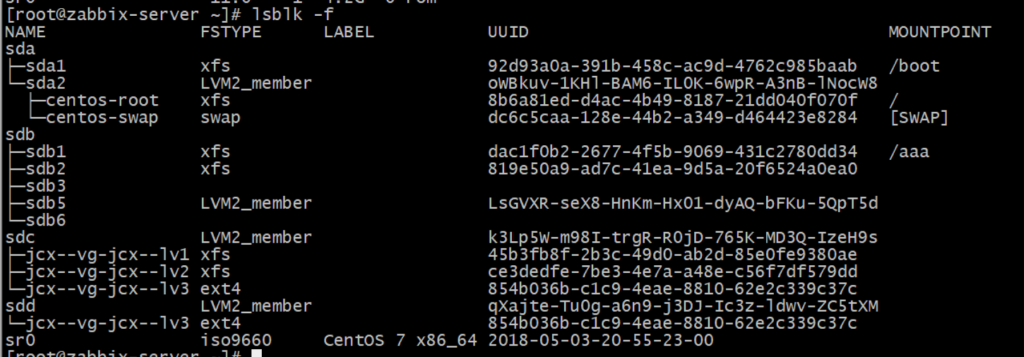
查看物理卷信息 [root@localhost ~]# pvscan PV /dev/sda2 VG centos lvm2 [<99.00 GiB / 4.00 MiB free] PV /dev/sde lvm2 [10.00 GiB] PV /dev/sdd lvm2 [10.00 GiB] Total: 3 [<119.00 GiB] / in use: 1 [<99.00 GiB] / in no VG: 2 [20.00 GiB] [root@localhost ~]# pvdisplay /dev/sdd "/dev/sdd" is a new physical volume of "10.00 GiB" --- NEW Physical volume --- PV Name /dev/sdd VG Name PV Size 10.00 GiB Allocatable NO PE Size 0 Total PE 0 Free PE 0 Allocated PE 0 PV UUID 47y265-R2aj-217k-ap9e-wl1t-4fzW-o2gbSQ
2、创建卷组
vgcreate v-- volume g -=-- group [root@localhost ~]# vgcreate woniu-vg /dev/sdd /dev/sde Volume group "woniu-vg" successfully created woniu-vg - 自定义卷组名称 /dev/sdd /dev/sde -- 要加入的物理卷名称,可以多个一起加入
查看vg信息 [root@localhost ~]# vgscan Reading volume groups from cache. Found volume group "woniu-vg" using metadata type lvm2 Found volume group "centos" using metadata type lvm2 [root@localhost ~]# vgdisplay --- Volume group --- VG Name woniu-vg System ID Format lvm2 Metadata Areas 2 Metadata Sequence No 1 VG Access read/write VG Status resizable MAX LV 0 Cur LV 0 Open LV 0 Max PV 0 Cur PV 2 Act PV 2 VG Size 19.99 GiB PE Size 4.00 MiB Total PE 5118 Alloc PE / Size 0 / 0 Free PE / Size 5118 / 19.99 GiB VG UUID EqyatF-xLVe-3Fjt-WL6b-pTd4-lc3p-A0j2jj
[root@localhost ~]# mkdir /woniu-lv1 [root@localhost ~]# mount /dev/woniu-vg/woniu-lv1 /woniu-lv1/
6、测试
[root@localhost ~]# cp /etc/passwd /woniu-lv1
7、扩容
#卷组 [root@localhost ~]# pvcreate /dev/sdc5 Physical volume "/dev/sdc5" successfully created. [root@localhost ~]# vgextend woniu-vg /dev/sdc5 Volume group "woniu-vg" successfully extended [root@localhost ~]# vgdisplay --- Volume group --- VG Name woniu-vg System ID Format lvm2 Metadata Areas 3 Metadata Sequence No 4 VG Access read/write VG Status resizable MAX LV 0 Cur LV 2 Open LV 1 Max PV 0 Cur PV 3 Act PV 3 VG Size <25.99 GiB PE Size 4.00 MiB Total PE 6653 Alloc PE / Size 1512 / <5.91 GiB Free PE / Size 5141 / 20.08 GiB VG UUID EqyatF-xLVe-3Fjt-WL6b-pTd4-lc3p-A0j2jj
#逻辑卷 [root@localhost ~]# lvextend -L +10G /dev/woniu-vg/woniu-lv1 Size of logical volume woniu-vg/woniu-lv1 changed from 2.00 GiB (512 extents) to 12.00 GiB (3072 extents). Logical volume woniu-vg/woniu-lv1 successfully resized.
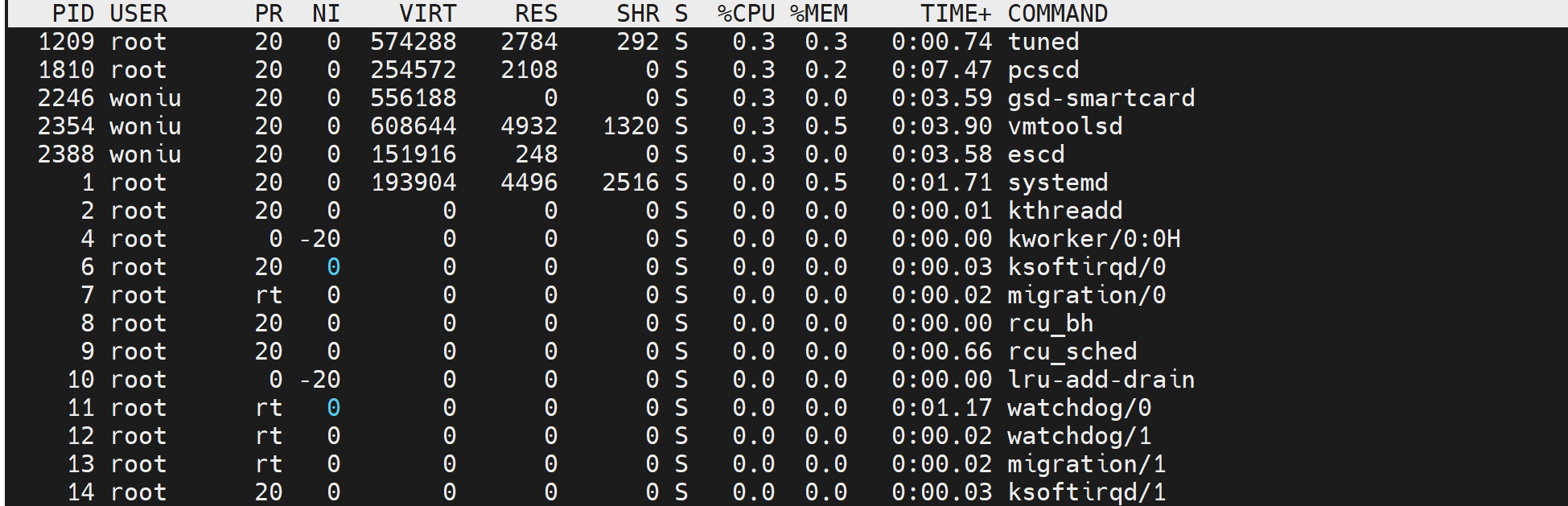
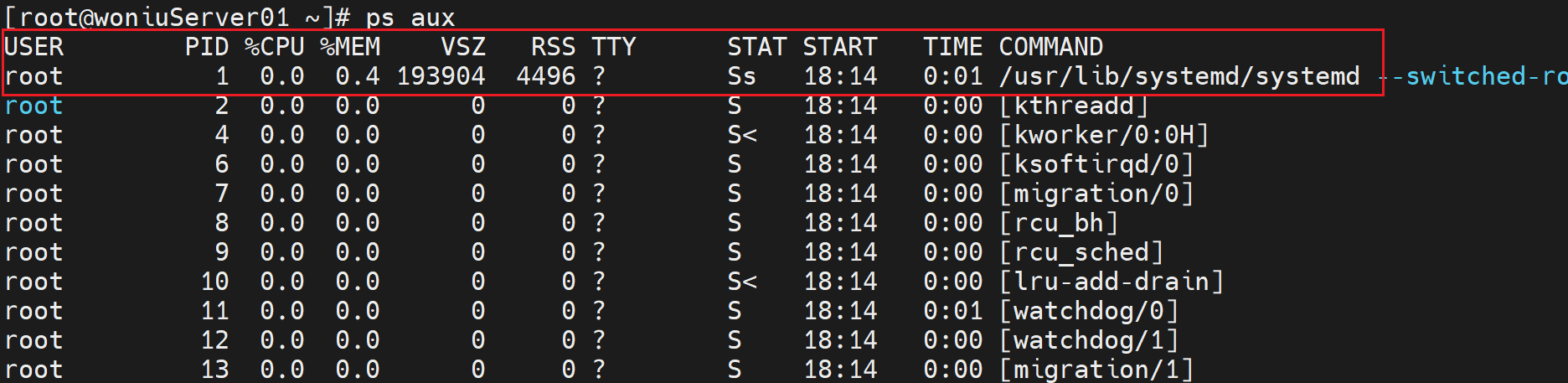
ps aux USER PID %CPU %MEM VSZ RSS TTY STAT START TIME COMMAND 用户名 进程ID cpu使用率 内存使用率
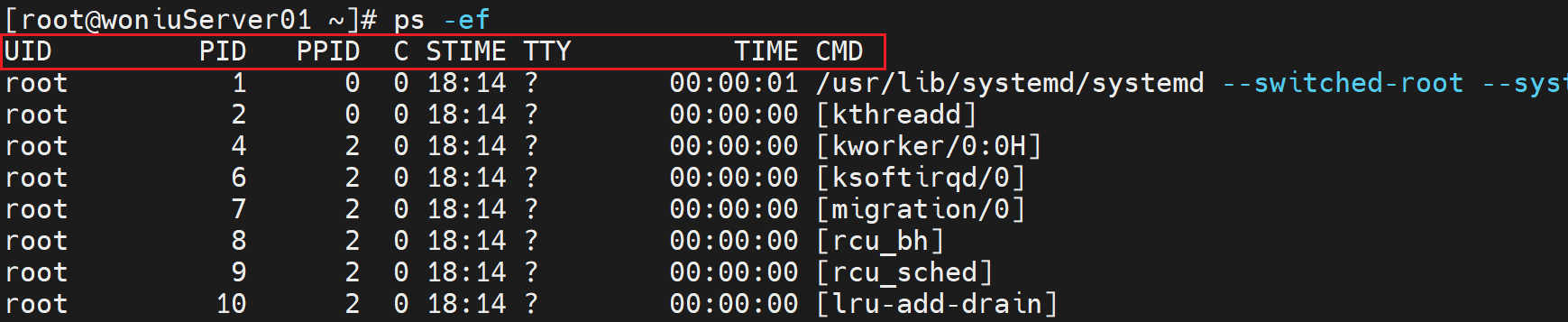
ps -ef 可以看到PPID父进程ID PPID则是创建该进程的父进程的ID
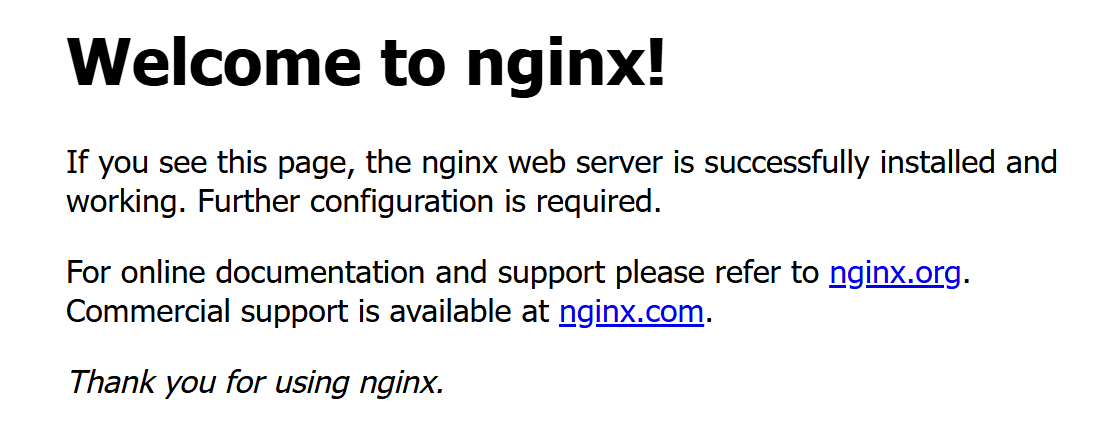
[root@localhost opt]# ps aux | grep -i nginx root 11917 0.0 0.0 39312 936 ? Ss 16:10 0:00 nginx: master process /usr/sbin/nginx nginx 11918 0.0 0.1 41784 1932 ? S 16:10 0:00 nginx: worker process nginx 11919 0.0 0.1 41784 1932 ? S 16:10 0:00 nginx: worker process root 11924 0.0 0.1 112824 1000 pts/0 S+ 16:10 0:00 grep --color=auto -i nginx
pstree 树形显示进程
ps -ef
UID
该进程执行的用户ID
PID
进程ID
PPID
该进程的父级进程ID,如果找不到,则该进程就被称之为僵尸进程(Parent Process ID)
C
Cpu的占用率,其形式是百分数
STIME
进程的启动时间
TTY
终端设备,发起该进程的设备识别符号,如果显示“?”则表示该进程并不是由终端设备发起
TIME
进程实际使用CPU的时间
CMD
该进程的名称或者对应的路径
aux是BSD风格,大家可以理解为两种风格只是显示不同
USER:该 process 属于哪个使用者账号 PID :该 process 的ID %CPU:该 process 使用掉的 CPU 资源百分比 %MEM:该 process 所占用的物理内存百分比 VSZ :该 process 使用掉的虚拟内存量 (Kbytes) RSS :该 process 占用的固定的内存量 (Kbytes) TTY :该 process 是在那个终端机上面运作,若与终端机无关,则显示 ?,另外, tty1-tty6 是本机上面的登入者程序,若为 pts/0 等等的,则表示为由网络连接进主机的程序。 STAT:该程序目前的状态,主要的状态有 R :该程序目前正在运作,或者是可被运作 S :该程序目前正在睡眠当中 (可说是 idle 状态),但可被某些讯号 (signal) 唤醒。 T :该程序目前正在侦测或者是停止了 Z :该程序应该已经终止,但是其父程序却无法正常的终止他,造成 zombie (疆尸) 程序的状态 START:该 process 被触发启动的时间 TIME :该 process 实际使用 CPU 运作的时间 COMMAND:该程序的实际指令
[root@localhost opt]# nice -5 nginx nginx: [emerg] bind() to 0.0.0.0:80 failed (98: Address already in use) nginx: [emerg] bind() to 0.0.0.0:80 failed (98: Address already in use) nginx: [emerg] bind() to 0.0.0.0:80 failed (98: Address already in use) nginx: [emerg] bind() to 0.0.0.0:80 failed (98: Address already in use) nginx: [emerg] bind() to 0.0.0.0:80 failed (98: Address already in use) nginx: [emerg] still could not bind() [root@localhost opt]# systemctl stop nginx [root@localhost opt]# nice -5 nginx
开启程序设置优先级
11.计划任务
1、计划任务的概念
1.1 计划任务的作用
定时执行任务 系统的备份、软件的更新
集中利用资源,避开业务高峰期游戏更新、软件维护
监控监控系统
1.2 计划任务的分类
系统执行的计划任务 - -- 周期性的任务
用户执行的计划任务 ---- 备份、执行脚本,一次性和周期性
程序执行的计划任务 -- 监控(心跳机制)、apache、nginx
2、一次性计划任务
2.1 atd服务
[root@localhost u01]# systemctl status atd ● atd.service - Job spooling tools Loaded: loaded (/usr/lib/systemd/system/atd.service; enabled; vendor preset: enabled) Active: active (running) since 二 2025-06-03 09:32:53 CST; 1h 8min ago Main PID: 7041 (atd) Tasks: 1 CGroup: /system.slice/atd.service └─7041 /usr/sbin/atd -f
6月 03 09:32:53 localhost.localdomain systemd[1]: Started Job spooling... Hint: Some lines were ellipsized, use -l to show in full. [root@localhost u01]# systemctl is-enabled atd enabled
2.2 at命令
at 时间 ---- 进入交互式配置 使用ctrl + d结束 [root@localhost u01]# at 10:46 at> toucgh at> touch /opt/at.txt at> <EOT> job 18 at Tue Jun 3 10:46:00 2025
-f选项 非交互式,后边一般接一个shell脚本
-l选项 显示我们未执行的计划任务 等同于atq命令 [root@localhost u01]# at -l 19 Tue Jun 3 10:55:00 2025 a root [root@localhost u01]# atq 19 Tue Jun 3 10:55:00 2025 a root
-d选项 删除未执行的计划任务 等同于atrm命令 [root@localhost u01]# at -l 19 Tue Jun 3 10:55:00 2025 a root 20 Tue Jun 3 10:59:00 2025 a root [root@localhost u01]# at -d 19 [root@localhost u01]# at -l 20 Tue Jun 3 10:59:00 2025 a root [root@localhost u01]# atrm 20 [root@localhost u01]# at -l
2.3 at中的时间
#绝对时间
#AM表示上午,PM表示下午 [root@localhost u01]# at 11:00AM at> ls /etc/shadow at> <EOT> job 21 at Tue Jun 3 11:00:00 2025 [root@localhost u01]# at 22:00PM Hour too large for PM. Last token seen: PM Garbled time
# midnight、noon、tealight [root@localhost u01]# at midnight at> ls /etc at> <EOT> job 22 at Wed Jun 4 00:00:00 2025 [root@localhost u01]# atq 21 Tue Jun 3 11:00:00 2025 a root 22 Wed Jun 4 00:00:00 2025 a root [root@localhost u01]# man at [root@localhost u01]# at noon at> ls /etc at> <EOT> job 23 at Tue Jun 3 12:00:00 2025 [root@localhost u01]# at -l 21 Tue Jun 3 11:00:00 2025 a root 22 Wed Jun 4 00:00:00 2025 a root 23 Tue Jun 3 12:00:00 2025 a root
#日期 [root@localhost u01]# at 12:00 20250604 Error in month number. Last token seen: 20250604 Garbled time [root@localhost u01]# man at [root@localhost u01]# at 12:00 06042025
#相对时间 now、today、tomorrow [root@localhost u01]# at now + 5 syntax error. Last token seen: 5 Garbled time [root@localhost u01]# at now + 5minutes [root@localhost u01]# at 14:00 today at> [root@localhost u01]# at 14:00 tomorrow at> <EOT>
2.4 at权限问题
默认情况下,/etc/at.deny文件定义使用at命令权限,在该文件内的用户不能使用at命令。
[haha@localhost ~]$ at now at> <EOT> job 36 at Tue Jun 3 11:28:00 2025 [haha@localhost ~]$ at now You do not have permission to use at.
[haha@localhost ~]$ at now at> <EOT> job 36 at Tue Jun 3 11:28:00 2025 [haha@localhost ~]$ at now You do not have permission to use at. [haha@localhost ~]$ at now at>
3、周期性计划任务
按照一定频率执行相关任务。
3.1 crond服务
[root@localhost u01]# systemctl status crond ● crond.service - Command Scheduler Loaded: loaded (/usr/lib/systemd/system/crond.service; enabled; vendor preset: enabled) Active: active (running) since 二 2025-06-03 09:32:53 CST; 2h 15min ago Main PID: 7044 (crond) Tasks: 1 CGroup: /system.slice/crond.service └─7044 /usr/sbin/crond -n
6月 03 09:32:53 localhost.localdomain systemd[1]: Started Command Sche... 6月 03 09:32:53 localhost.localdomain crond[7044]: (CRON) INFO (RANDOM... 6月 03 09:32:54 localhost.localdomain crond[7044]: (CRON) INFO (runnin... Hint: Some lines were ellipsized, use -l to show in full.
[root@localhost ~]# systemctl status rsyslog ● rsyslog.service - System Logging Service Loaded: loaded (/usr/lib/systemd/system/rsyslog.service; enabled; vendor preset: enabled) Active: active (running) since 二 2025-06-03 09:32:53 CST; 4h 33min ago Docs: man:rsyslogd(8) http://www.rsyslog.com/doc/ Main PID: 7022 (rsyslogd) Tasks: 9 CGroup: /system.slice/rsyslog.service └─7022 /usr/sbin/rsyslogd -n
6月 03 09:32:52 localhost.localdomain systemd[1]: Starting System Logg... 6月 03 09:32:53 localhost.localdomain rsyslogd[7022]: [origin softwar... 6月 03 09:32:53 localhost.localdomain systemd[1]: Started System Loggi... Hint: Some lines were ellipsized, use -l to show in full.
主要配置文件
[root@localhost ~]# ls /etc/rsyslog. rsyslog.conf rsyslog.conf.bak rsyslog.d/
[root@localhost log]# logger "this is my log" [root@localhost log]# tail -1 /var/log/messages Jun 3 15:28:44 localhost root: this is my log
logrotate命令:
日志轮转命令
5、远程日志传输
实现日志文件的远程传输
5.1 架构
日志服务器 - - 客户端
5.2 连通性(2台虚拟机)
首先查看2台虚拟机的IP地址
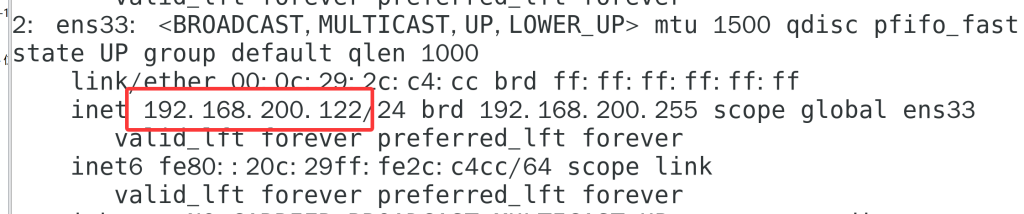
服务器: [root@localhost log]# ip a show ens33(真实网卡名称) 2: ens33: <BROADCAST,MULTICAST,UP,LOWER_UP> mtu 1500 qdisc pfifo_fast state UP group default qlen 1000 link/ether 00:0c:29:2c:c4:cc brd ff:ff:ff:ff:ff:ff inet 192.168.200.128/24 brd 192.168.200.255 scope global dynamic ens33 valid_lft 827sec preferred_lft 827sec inet6 fe80::20c:29ff:fe2c:c4cc/64 scope link valid_lft forever preferred_lft forever 客户端: [root@woniu ~]# ip a show ens33 2: ens33: <BROADCAST,MULTICAST,UP,LOWER_UP> mtu 1500 qdisc pfifo_fast state UP group default qlen 1000 link/ether 00:0c:29:5f:35:6c brd ff:ff:ff:ff:ff:ff inet 192.168.200.166/24 brd 192.168.200.255 scope global noprefixroute ens33 valid_lft forever preferred_lft forever inet6 fe80::9ae2:e2fc:4e31:cd46/64 scope link noprefixroute valid_lft forever preferred_lft forever
测试网络连通性:
#网络联通的状态 [root@localhost log]# ping 192.168.200.166 PING 192.168.200.166 (192.168.200.166) 56(84) bytes of data. 64 bytes from 192.168.200.166: icmp_seq=1 ttl=64 time=0.508 ms 64 bytes from 192.168.200.166: icmp_seq=2 ttl=64 time=0.887 ms ^C --- 192.168.200.166 ping statistics --- 2 packets transmitted, 2 received, 0% packet loss, time 1006ms rtt min/avg/max/mdev = 0.508/0.697/0.887/0.191 ms #网络不联通的状态 [root@localhost log]# ping 192.168.200.111 PING 192.168.200.111 (192.168.200.111) 56(84) bytes of data. From 192.168.200.128 icmp_seq=1 Destination Host Unreachable From 192.168.200.128 icmp_seq=2 Destination Host Unreachable From 192.168.200.128 icmp_seq=3 Destination Host Unreachable
logrotate命令: -d选项 模拟轮转 [root@localhost log]# logrotate -d /etc/logrotate.d/nginx reading config file /etc/logrotate.d/nginx Allocating hash table for state file, size 15360 B
Handling 1 logs
rotating pattern: /var/log/nginx/*.log after 1 days (10 rotations) empty log files are not rotated, old logs are removed considering log /var/log/nginx/access.log log does not need rotating (log is empty)considering log /var/log/nginx/error.log log does not need rotating (log is empty)not running postrotate script, since no logs were rotated
#-d选项 模拟轮转 [root@localhost log]# logrotate -d /etc/logrotate.d/nginx reading config file /etc/logrotate.d/nginx Allocating hash table for state file, size 15360 B
Handling 1 logs
rotating pattern: /var/log/nginx/*.log after 1 days (10 rotations) empty log files are not rotated, old logs are removed considering log /var/log/nginx/access.log log does not need rotating (log is empty)considering log /var/log/nginx/error.log log does not need rotating (log is empty)not running postrotate script, since no logs were rotated
基于UUID的命名(例如,ens33):这种命名方式是基于网络接口的唯一标识符(UUID),而不是其物理位置。例如,ens33中的“ens”代表“Ethernet Name Space”,而数字或字母组合(如33)是接口的UUID的一部分。这种命名方式有助于避免因物理位置的改变而导致网络接口名称的不一致。
2、Linux网络服务
2.1network服务
centos6以前用的默认的网络服务
network -- 网络
network适合服务器管理网络 ,通过配置文件的方式管理linux网络。
network更适合配置静态IP地址。
centos7 建议 使用network。
停止服务测试:
[root@localhost ~]# systemctl stop network
正常的状态:
停止服务的状态:
网络停止服务,IP地址消失
解决方法:
重启网络服务
[root@localhost ~]# systemctl restart network
1、查看网络状态
systemctl status network systemctl status NetworkManager
[root@localhost ~]# nmcli general status STATE CONNECTIVITY WIFI-HW WIFI WWAN-HW WWAN 连接的 完全 已启用 已启用 已启用 已启用 STATE:网络是否连接 CONNECTIVITY:NetworkManager是否接管网络设置 WIFI-HW:表示WIFI的硬件是否启用 WIFI:表示WIFI软件是否启用 WWAN-HW:表示WWAN的硬件(支持3G/LTE技术的物理接口) WWAN:表示WWAN的软件
查看设备状态nmcli device status
[root@localhost ~]# nmcli device status DEVICE TYPE STATE CONNECTION ens33 ethernet 连接的 ens33 virbr0 bridge 连接的 virbr0 lo loopback 未托管 -- virbr0-nic tun 未托管 --
重启网卡后生效 [root@localhost ~]# nmcli connection down ens33 && nmcli connection up ens33 #成功取消激活连接 'ens33'(D-Bus 活动路径:/org/freedesktop/NetworkManager/ActiveConnection/4)
nmtui简易图形化配置
nmtui (Network Manager Text User Interface)nmtui的英文全称是Network Manager Text User Interface)是一个基于文本界面的网络管理工具,用于在 Linux 系统中配置和管理网络连接。它提供了一个用户友好的交互方式,使用户能够轻松地添加、删除和编辑网络连接,以及查看当前网络状态。